Three menu bar icons: why I merged them into one Mac app
For a long time my menu bar had three icons that did three versions of the same thing: hold on to something for a moment so I could put it somewhere else.
A clipboard manager, because the system clipboard remembers exactly one item. A file shelf, because dragging a file between two windows means keeping both visible and not slipping. A dictation app, because typing long text is slower than saying it.
Each of those tools is good. That is the part people expect me to skip, so let me say it first.
The tools are not the problem
Maccy is free, open source, and fast enough that most people never need to look further. Paste has the best visual history on the platform. Pastebot has filters that will transform a clip on the way out, which nothing else does as elegantly. Yoink essentially defined the file-shelf category. Superwhisper and Wispr Flow do fast, accurate dictation. Alfred and Raycast will sell you a launcher with clipboard history attached, and if you already live in a launcher that is a perfectly good answer.
I used several of these for years. None of them is badly built. If you only need one of the three jobs, buy the specialist and stop reading — you will be happier than with anything that tries to do all three.
The problem only appears when you need all three.
The cost is the seams
Three separate apps means three menu bar icons, three preference windows, three update mechanisms, three permission prompts after every macOS upgrade, and three shortcuts to keep from colliding with each other and with everything else.
That last one is worse than it sounds. Every one of these tools wants a global hotkey, because a global hotkey is the whole point. Three of them competing for finger memory means you hesitate — and a tool you hesitate over is a tool you stop reaching for. The value of this category is measured in the fraction of a second between wanting something and having it. Hesitation eats the entire product.
Then there is the money. Priced individually, and taking each vendor’s entry tier as of July 2026: Paste is a subscription from about $2.49/month, Superwhisper from about $8.49/month, Raycast Pro from about $8/month, Wispr Flow from about $12/month. Yoink is a one-time $8.99, Pastebot $12.99, Unclutter $19.99, the Alfred Powerpack around $45. Assemble a set that covers all three jobs and you are somewhere between a modest one-time spend and roughly $20 a month, forever, for three utilities that each do one thing.
I do not think any of those prices is unfair. Independent Mac developers should charge for their work. But I did not want to hold four separate billing relationships for what is, to me, one habit.
One shortcut, three modes
So Jackdaw is one app on one shortcut — ⌘⌃V — that opens a clipboard history, a file shelf, and dictation.
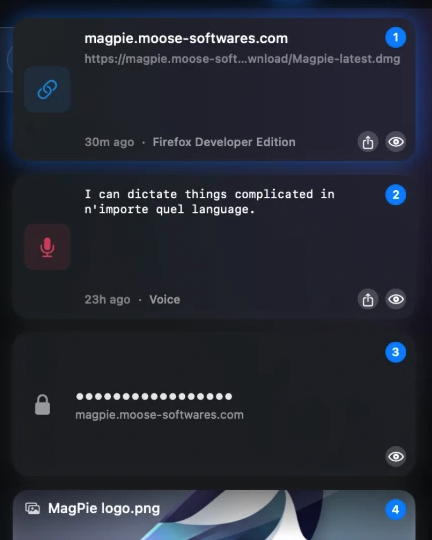
That constraint turned out to be the entire design. When there is only one way in, everything has to be reachable from that one panel without a mode switch that makes you think. Clipboard history is the default because it is the most frequent. The shelf is beside it because staging files is the same reflex applied to a different object. Dictation runs wherever your cursor already is, so it never needs the panel at all.
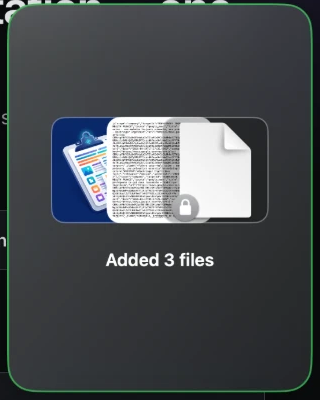
Merging them also removed problems I had not framed as problems. One permission prompt after a macOS upgrade. One update. One thing to trust.
What that made hard
The interesting engineering was not the features, it was the merge.
macOS gives you no notification when the clipboard changes — every clipboard
manager is a polling loop around NSPasteboard.changeCount. Doing that in the
same process as a live audio engine, without either one starving the other,
constrains both. I wrote up the clipboard side of that separately, including the
autorelease-pool bug that only shows up after the app has been running for
weeks: NSPasteboard, changeCount, and four traps.
Dictation runs on-device, on a multilingual Parakeet v3 model compiled to the Neural Engine — 25 languages with automatic detection, so you can switch mid-sentence without telling it to. That is a real cost: the model downloads on first use, it holds memory while loaded, and a cloud API would have been dramatically less work. It is also the reason there is no per-minute quota and no audio leaving the machine, which was not negotiable for a tool that sits over everything you type.
The app is Rust and Swift. Not because native is a virtue in itself, but because this thing is resident all day and idles next to your work. An Electron process sitting in the background waiting for a hotkey is a strange trade.
What I deliberately did not build
No cloud sync. Not because sync is bad — Paste and Pastebot both do it well, and for multi-Mac users it is genuinely the right feature. But sync means my servers holding your clipboard, and I would rather ship a smaller product than ask for that trust.
No plugin system. No AI rewriting of your clipboard. No launcher. Each of those would make the app more impressive in a feature table and slower to open, and this category is decided on the fraction of a second.
Pricing follows from the same logic rather than from a growth model: 14 days free, then €5 once and it is yours. There is no subscription, because I am asking you to replace tools you may already have paid for once, and it seemed wrong to answer that with a monthly bill.
Whether it is for you
If you need one of the three jobs, buy the specialist. Maccy is free and excellent. Yoink is nine dollars and has done its job for a decade.
If you have three icons in your menu bar and three shortcuts you sometimes confuse, that is the specific problem this was built for. Jackdaw needs macOS 26 or later on an Apple silicon Mac, and the trial is the whole app for fourteen days.
Prices above are each vendor’s entry tier as published in July 2026 and will drift; the comparison pages on this site carry a verification date.